You are located in service: Identity Management

Delete Account

Delete Account

guide

This page describes how to delete your accounts.


Please note

You can delete accounts that you have created yourself (e.g., RWTH Collaboration, library card). However, you cannot delete accounts that were created automatically based on your status.

Step 1
Open the IdM Selfservice.

Step 2
Click Accounts and Passwords.

Step 3
Click Delete Account.

Step 4
In the table, select the account you want to delete, then click Next.
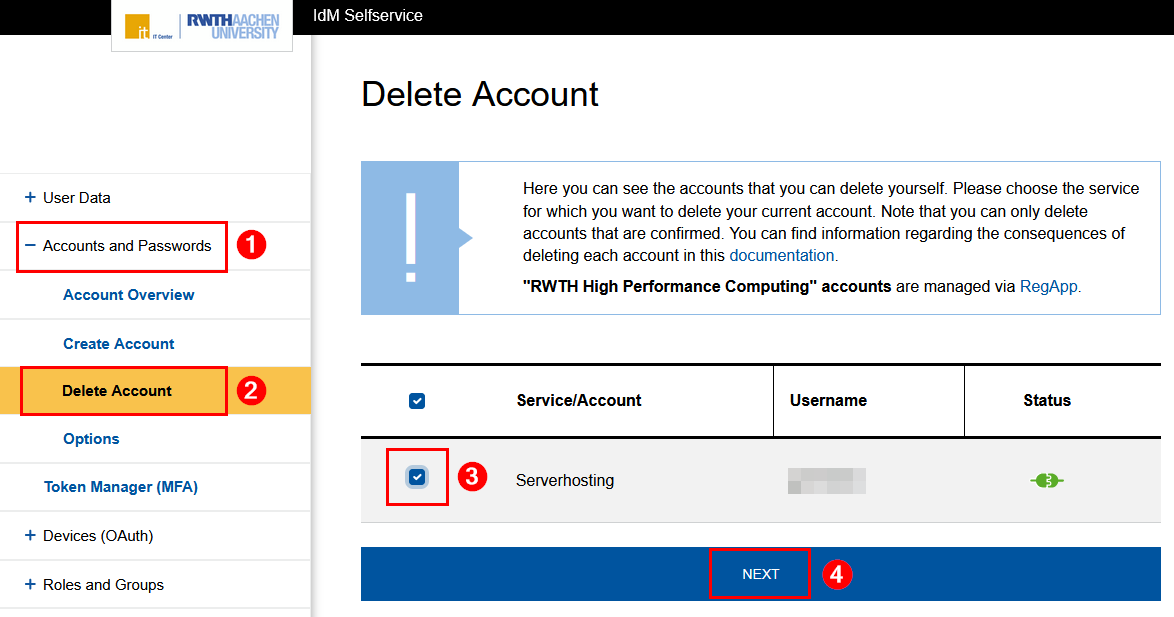
Screenshot of the IdM Selfservice. "Delete Account" is the third item in the expandable section "Accounts and Passwords". Step 4 describes the page itself.

Step 5
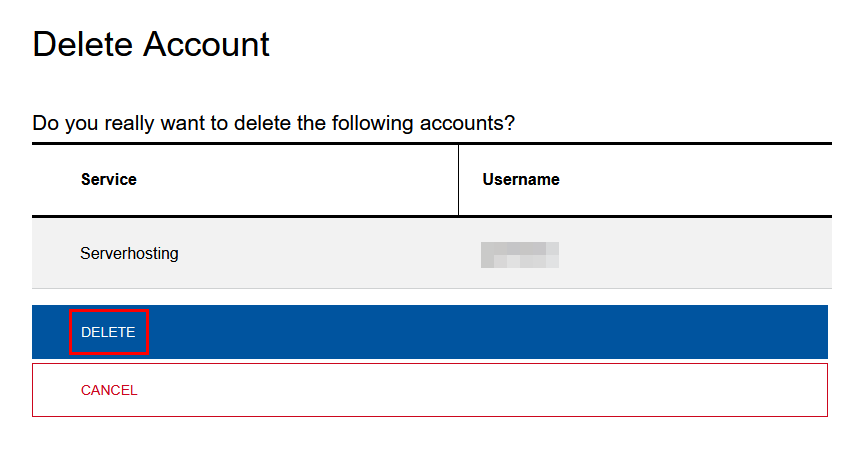
Click Delete.

Screenshot of the page "Delete Account".  The accounts to be deleted are listed in a table. The Delete button is located underneath.

Your account has been deleted.

last changed on 12/10/2025

How did this content help you?

Creative Commons Lizenzvertrag
This work is licensed under a Creative Commons Attribution - Share Alike 3.0 Germany License