


Identity verification RA-Portal

If you do not have an employee or student status at RWTH, you need an identity verification before you can apply for a user certificate in the RA-Portal.
On this page, you will learn how to perform an identity verification. To do so, two steps are required:
1. Create ID verification code in the RA-Portal
If an identity verification is required, a corresponding notice will be displayed after you click My client certificates and then Request client certificate in the RA-Portal.
To carry out an ID verification, you must first personally (i.e., with your own user ID) generate an ID verification code in the RA-Portal.
Agree to the data processing and click Start identity verification to continue.
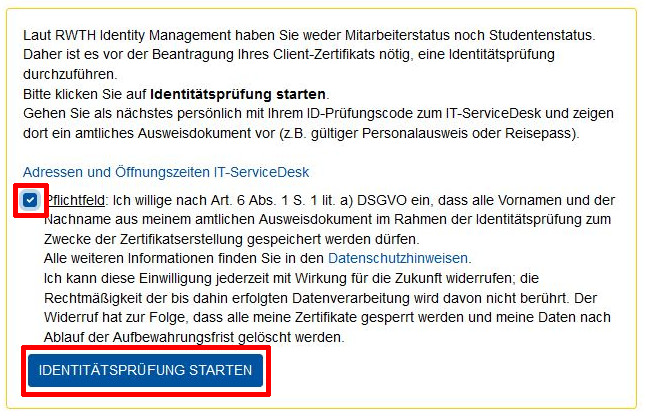
Note (or screenshot) the generated ID verification code. Without this code the ID verification cannot take place. IT-ServiceDesk staff cannot look up the code for you.

2. Personal ID verification at the IT-ServiceDesk
Please bring the following documents to a location of the IT-ServiceDesk.
- Your ID verification code
- a valid identification document (passport, ID card or German residence permit)
- Attention! Driver’s licences cannot be used as identification documents.
IT-ServiceDesk staff will check your identification document and record your full name in the RA-Portal. All your user certificates will be issued under this name.
After the identity verification you can request a client certificate in the RA-Portal.
