


Structure and editing


Note
On this page you will learn how RWTHcontacts (opens in new tab) is structured.
On the RWTHcontacts start page you can choose between Organization tree, Organization search and Person search:

Organizations
Search for organizations
In RWTHcontacts you have two ways to search for organizations: the Organization tree and the Organization search.
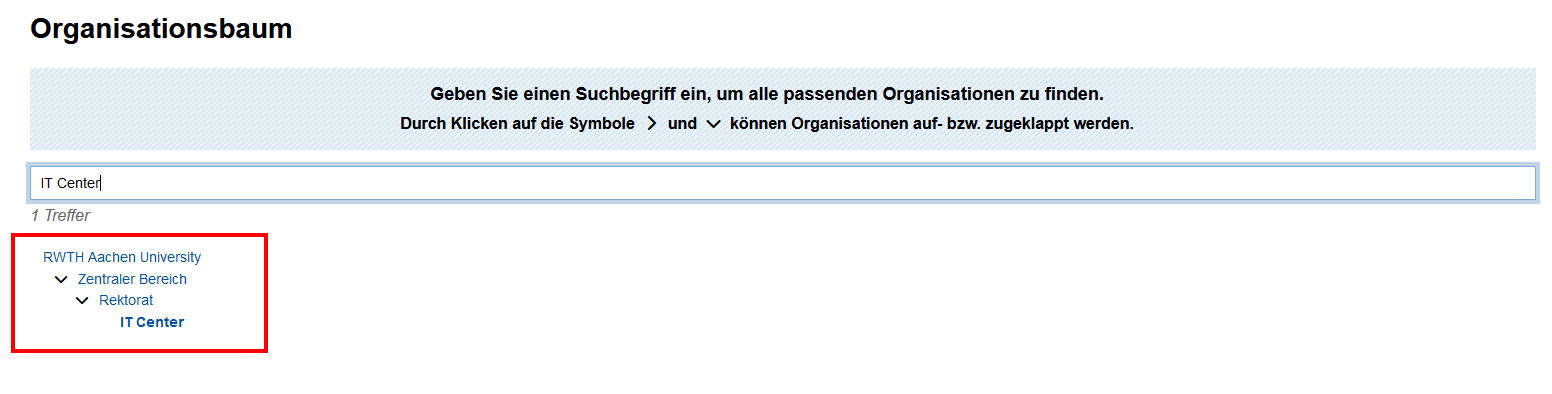
In the Organization‑tree view you can type the name of the organization.
This tells you to which faculty, department or working group the organization belongs.
Click the organization name to go to the overview page:
In the Organization‑search view you can search by name, abbreviation, institutional code (IKZ) and OrgID.
By clicking the organization name you reach the overview page:

Overview organization page

The page of an organization is divided into the following sections:
- Contact information: building number, address, phone number, website
- Organization data: OrgID, IKZ, abbreviation
- Parent organization: position in the organization tree
- Employees of the organization: staff members. Employees can be grouped by headings.
Additional information about the organization can be added using comments. Comments are recognized by the info‑symbol in front of the name. In the screenshot above the fax number of the management was added as a comment.
Information that is not a person, organization, comment or heading is called an “object”. These are e.g. secretariats or student councils. They are identified by the thumb‑tack symbol in front of the name.
People
Search for people
With the person search you can look for RWTH staff as well as for objects (e.g., secretariats).
The result shows the name, title, organizational affiliation and contact details of the person.
Click the name to go to the person overview page:

If you are unsure about the spelling of a name, you can append a "%" to the search term. For example, searching for “Schmi%t” will return all persons with the names “Schmitt” and “Schmidt”.
Overview person page

On a person page you will find the following information:
- First and last name
- Organizational affiliation
- Room and building
- Address
- Phone number
- E‑mail address
- Website
- Profile picture: If you upload an image via the PictureManager, it will be shown in RWTHcontacts.
If a person is assigned to several organizations, all organizations are displayed.
Who is responsible for data maintenance?
The data shown in RWTHcontacts originate from various sources. It may take up to 24 hours for changes to become visible in RWTHcontacts.
- Please contact your organization administration in the following cases:
- if you want to be added to or removed from RWTHcontacts;
- for errors in contact data and addresses of people or organizations;
- for errors in organizational affiliation;
- for errors in headings, objects and comments.
- For errors in the first name, last name or academic title, please contact the appropriate data source.
- For errors in organization names, IKZ or OrgID, please contact the Department 5.1 (opens in new tab).
- To delete an organization, please contact the Department 5.1 (opens in new tab).
