


Email routing application

On this page you will learn how to access MailAdm and use the functions of e-mail routing.
To be able to access the application, you first need the role Verwaltung E-Mail-Routing (E-mail routing administration).
This role must be assigned to at least one person in your organization if your organization uses or intends to use the IT Center’s e-mail routing.
If you do not have this role, please contact your organization’s role management.
If your organization does not have role management, please contact the (Send an email to:) IT ServiceDesk.
Access
Step 1
Open RWTH MailAdm (opens in new tab). Login is via RWTH Single Sign-On.
Step 2
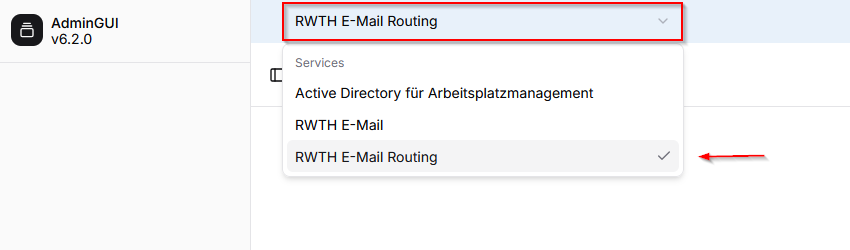
In the header, select RWTH E-mail Routing from the drop-down menu:
Step 3
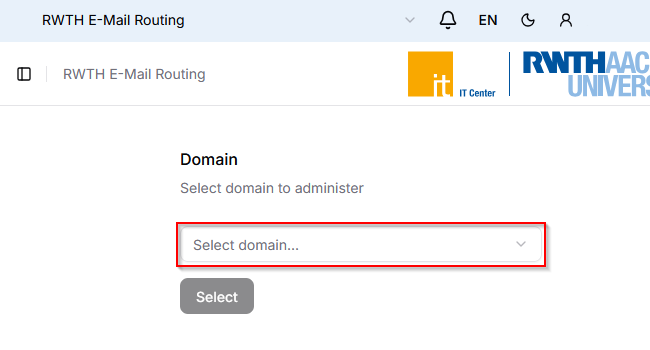
Select the desired mail domain and click Select to confirm:
Functions
After successfully accessing the application, you can use the following functions:
Overview
In the overview you can see all e-mail addresses that are currently stored for recipient verification.
Using the search function, you can search for names and addresses:

Synchronization process
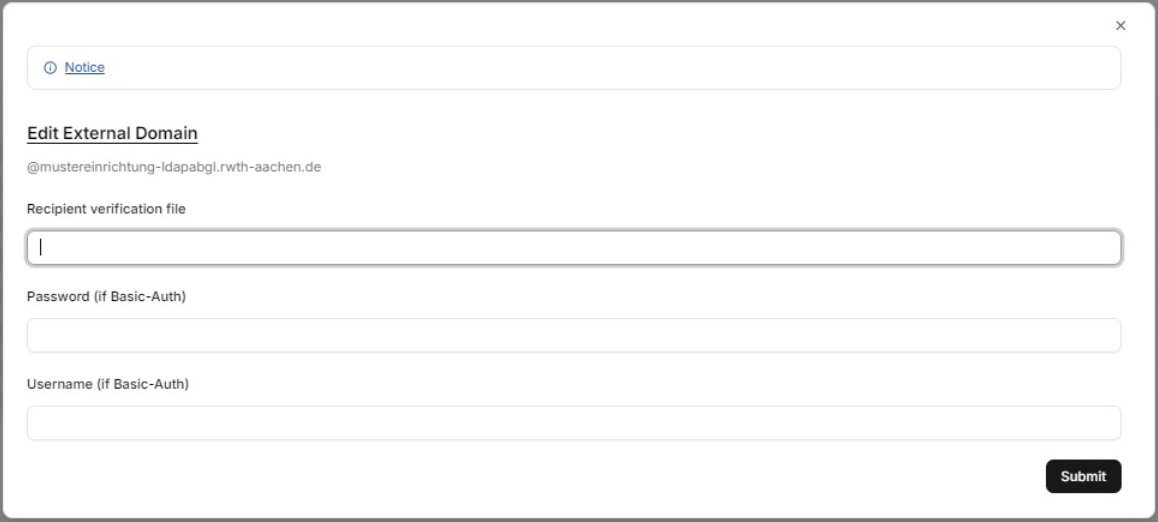
To start the synchronization process for the first time, you must enter a URL and login credentials (username and password) here. These are used so that the data on the stored page can be checked.
Once this has been done, the data is automatically synchronized every hour:
If problems occur, please check whether the IP 134.130.54.67 is whitelisted.
If more than 20 % of the entries originally stored with the IT ServiceDesk have been deleted in the recipient verification file, synchronization is automatically stopped for security reasons.
This is intended to prevent too many e-mail addresses from becoming invalid for recipient verification due to (creation) errors in the recipient verification file, meaning that no more e-mails would be accepted for them.
