


API keys and access

This page describes how to create an API key for RWTHgpt and use it to access the available KI:connect models via the API (Application Programming Interface).
An API key is a secret access key that allows applications to securely access a chatbot service. It is used to identify and authenticate requests, regulate permissions, and enable control and allocation of usage. API keys are used to integrate chatbots into your own applications, websites, or internal systems and must be treated confidentially.
The KI:connect API is OpenAI-compatible. This means that, for example, the OpenAI SDK can be used with an adjusted base URL. The API is accessible at the base URL https://chat.kiconnect.nrw/api/v1. Authentication is handled via a Bearer Token, with the API key passed in the HTTP header (Authorization: Bearer <API-Key>).
To generate an API key, please follow the steps below:
Step 1
Log in to the KI:connect web interface (opens in new tab) via RWTH Single Sign-On.
Step 2
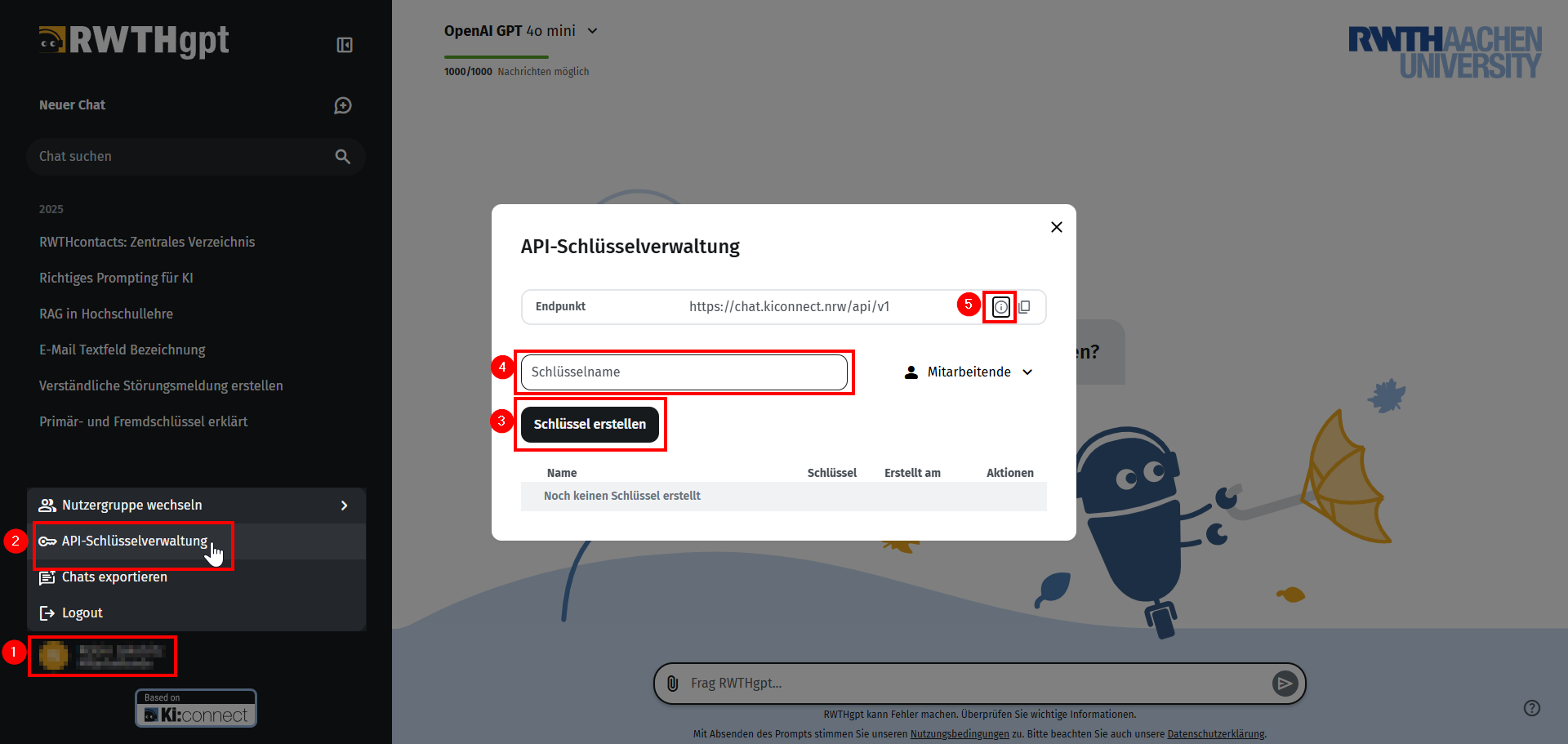
Click on your name (1) in the lower left corner and select API Key Management (2).
Step 3
Now click on Create Key (3).
A personalized API key will be created.
You can optionally assign a name to the key under Key Name (4).
Via the information icon (5), you can access the external KI:connect API documentation (opens in new tab). There you will find information on the supported API endpoints (e.g. chat/completions, responses, embeddings, and models) as well as the currently supported models (opens in new tab).
Notes on Usage
API requests count against the same limits as usage via the web interface – there is no separate quota. This means that group, token, and cost limits of your user group apply equally to API requests. In addition, the number of parallel requests per person is limited. Users who are members of multiple user groups can specify for their API key which user group the usage of AI models is attributed to.
Virtual API keys are valid for one month. The validity period is automatically extended by another month if you log in to the web interface during that period. Therefore, if you log in regularly, manual rotation is not necessary.
If you do not log in to the web interface in a timely manner, the API key will expire and can no longer be used. In this case, you must generate a new API key using the “Rotate” function.
Which models are currently available for API use and which display name can be used to access them via the API can be found in the model overview (opens in new tab). The model cards also provide information on which models are available as embedding endpoints.
Please note: The model parameter in API requests expects the display name of the model as listed in the model overview (e.g. OpenAI GPT OSS 120B) – not a technical short name or slug. An incorrect spelling will result in errors.
