API keys and access

On this page, you will learn what an API key is and how you can create one for RWTHgpt.
An API key is a secret access key that allows applications to securely access a chatbot service. It is used to identify and authenticate requests, regulate permissions, and enable control and allocation of usage. API keys are used to integrate chatbots into your own applications, websites, or internal systems and must be treated confidentially.
To generate an API key, please follow these steps:
Step 1
Log in to the KI:connect web interface via RWTH Single Sign-On.
Step 2
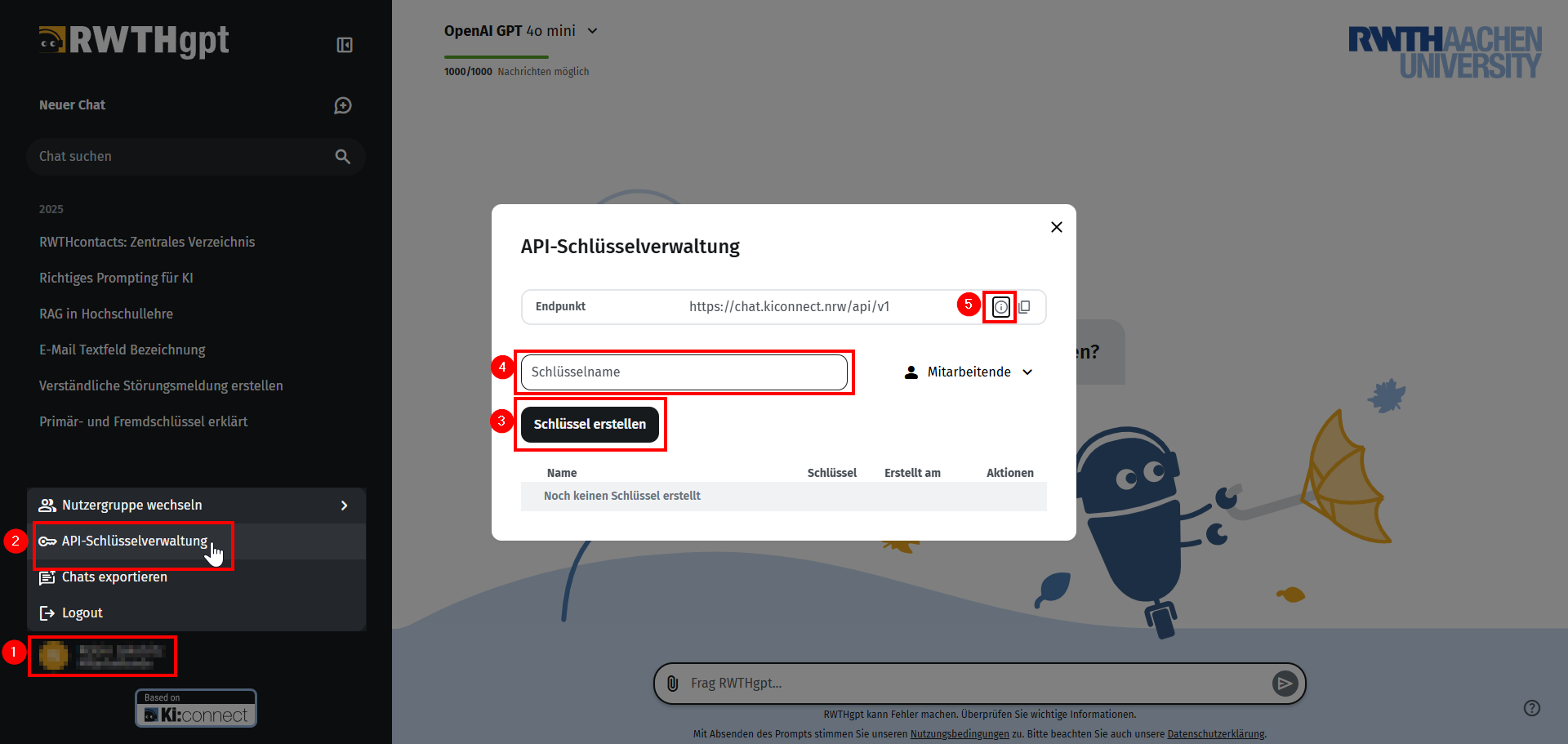
Click on your name (1) in the lower left corner and select API Key Management (2).
Step 3
Now click on Create Key (3).
A personalized API key will be created.
If desired, you can assign a name yourself under Key Name (4).
If you have multiple statuses, you can select the permissions for which the key should be issued.
The information icon (5) takes you to the external KI:connect API documentation, where you can check which chat models are available for API access.