Right Manager

This page provides a brief overview of the basic functions and operation of Rightsmanager.
The Right Manager is an interface between the IdM Role and Group Management and the network database. The Right Manager uses groups to control the access permissions of individuals within individual organizations to specific network applications.
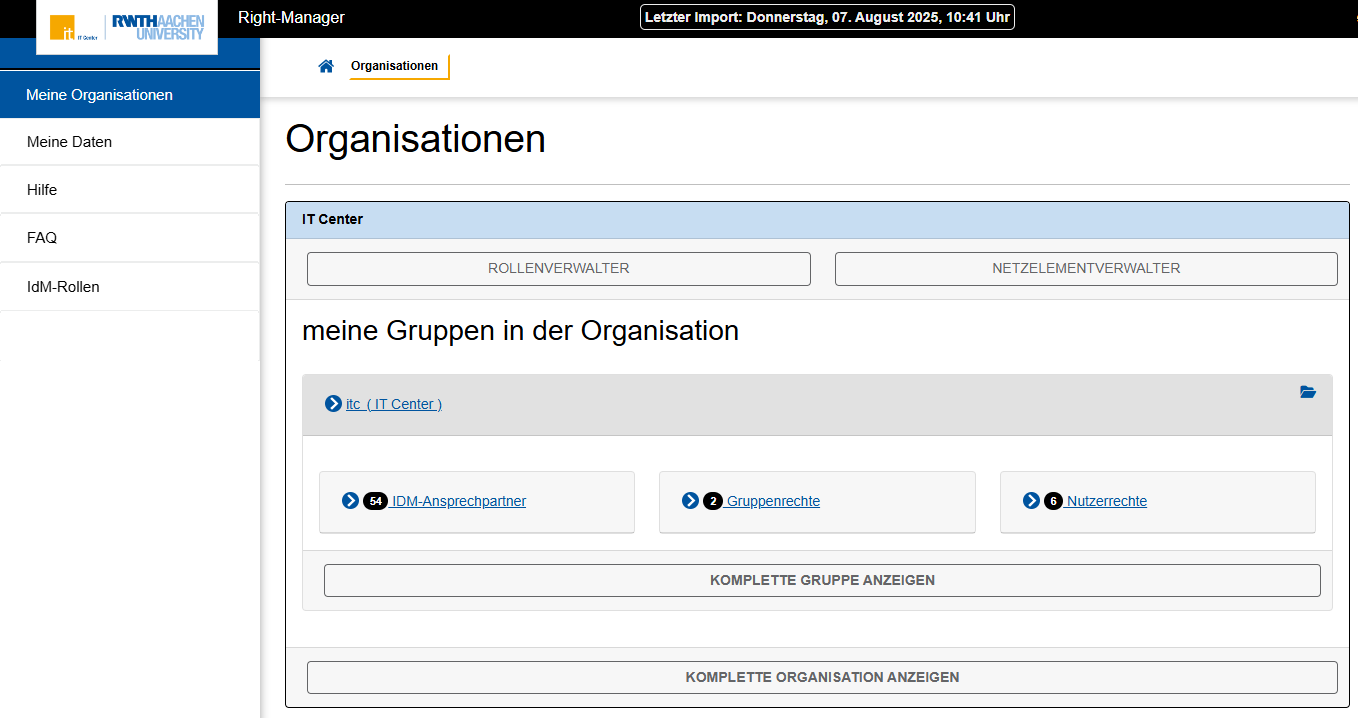
Organizations, groups, and persons are exported by the Right Manager from the IdM Role and Group Management at regular 5-minute intervals and subsequently imported into the Right Manager database. The time of the last import is displayed at the top of the page.
The Right Manager offers group members a clear summary of the organizations and groups to which they are assigned. Under the menu item My Organizations (Meine Organisationen), you will find an overview of all data relevant to you and your organization.
- Role Manager (Rollenverwalter) lists persons who hold the role Manage Roles in the organization.
- Network Element Manager (Netzelementverwalter) lists the persons who hold the role Manage Network Elements in the organization.
- My Groups in the Organization (meine Gruppen in der Organisation) lists all groups in which you are a member.This area also contains additional network contacts for this group and information on what groups and user rights you possess.
- Show Complete Group (Komplete Gruppe anzeigen) additionally lists the networks and domains that are assigned to the group.
- Show Complete Organization (Komplette Organisation anzeigen) additionally lists all networks and domains as well as all groups that are assigned to the organization.